A calmer way to run your kitchen

Your kitchen,
in sync.

Know what’s fresh. Cook what you have. Shop only for what you need—all from one beautifully simple app.

Free to download · Available now for iPhone and iPad

QR code linking to KeepItFresh on the App Store Scan to downloadOpen KeepItFresh on your iPhone
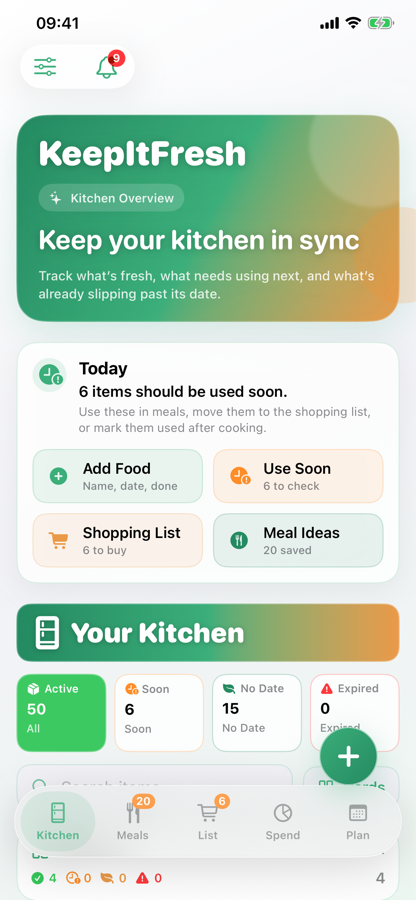
KeepItFresh kitchen overview showing inventory, items to use soon and shopping list
Kitchen sortedEverything in one place
6 items to use soonWaste less this week
Know what’s freshSee your fridge, freezer and cupboards
Cook what you haveTurn ingredients into useful meal ideas
Shop only for what you needKeep your list connected to your kitchen

How it works

Three everyday jobs.
One calmer kitchen.

KeepItFresh connects what you own, what you can cook and what you need to buy.

01

Know what’s fresh

See what you have.

Keep food visible across your fridge, freezer and cupboards, with expiry dates that show what needs using first.

  • Live kitchen inventory
  • Clear “use soon” view
02

Shop smarter

Buy what you need.

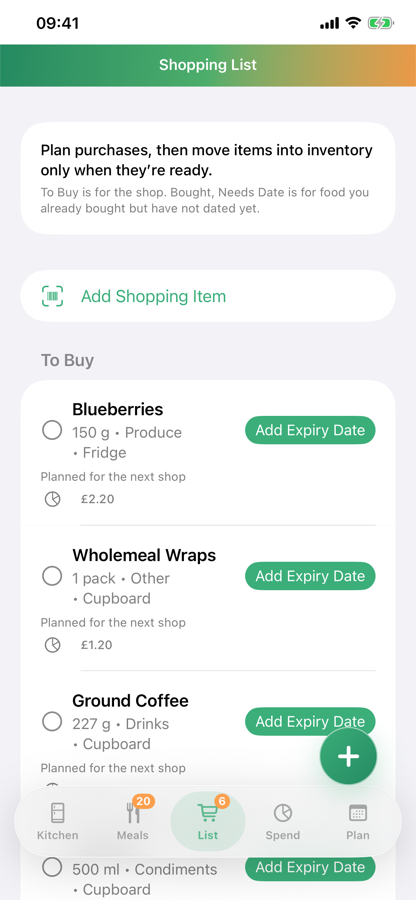
Build a focused shopping list, remember essentials and move bought items straight into your kitchen.

  • Connected shopping list
  • Helpful reminders
03

Cook what you have

Turn food into dinner.

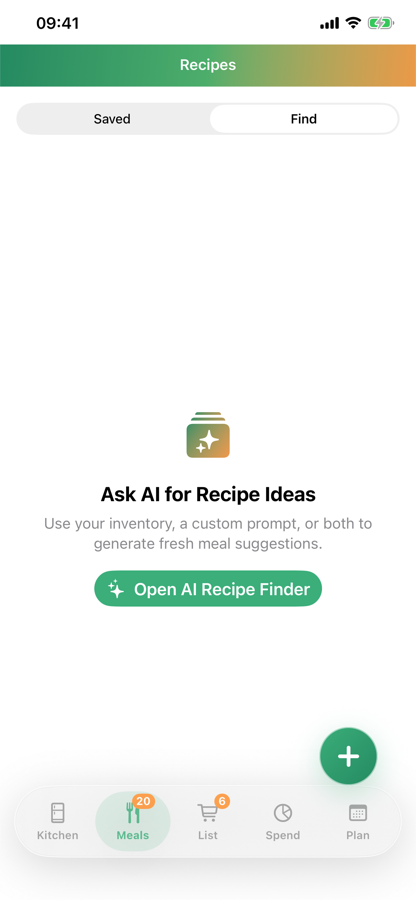
Find recipe inspiration from ingredients already in your kitchen, then save the ideas you love.

  • AI recipe inspiration
  • Saved favourites

The app in action

The full picture.
Less admin.

Add a shop quickly, keep recipes close and understand where your grocery budget goes—all without juggling separate notes and apps.

Add by hand, barcode or receipt Plan meals and save recipes See your grocery spend clearly
View on the App Store
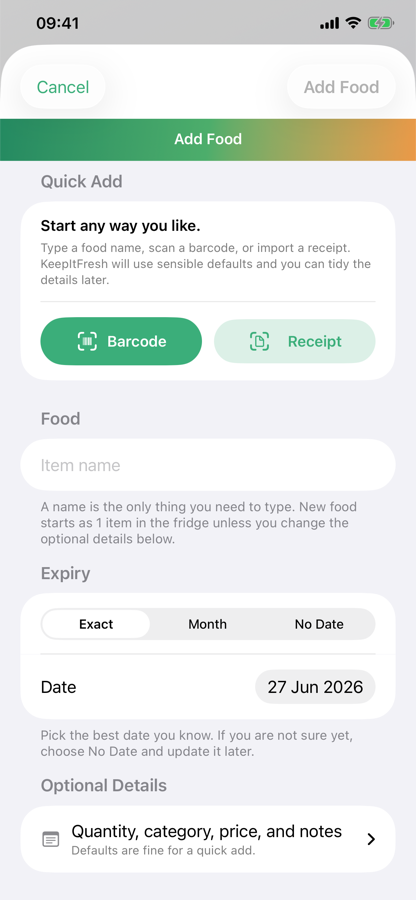
KeepItFresh options for adding food
Quick addManual, barcode or receipt
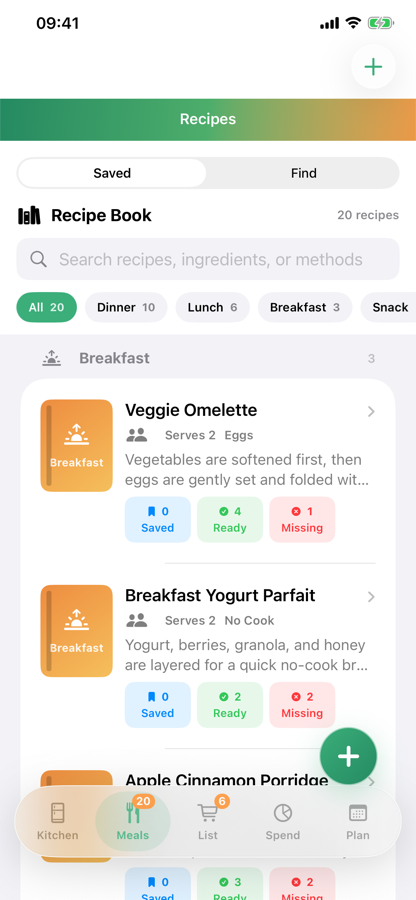
Saved recipes in KeepItFresh
Saved recipesGood ideas, ready again
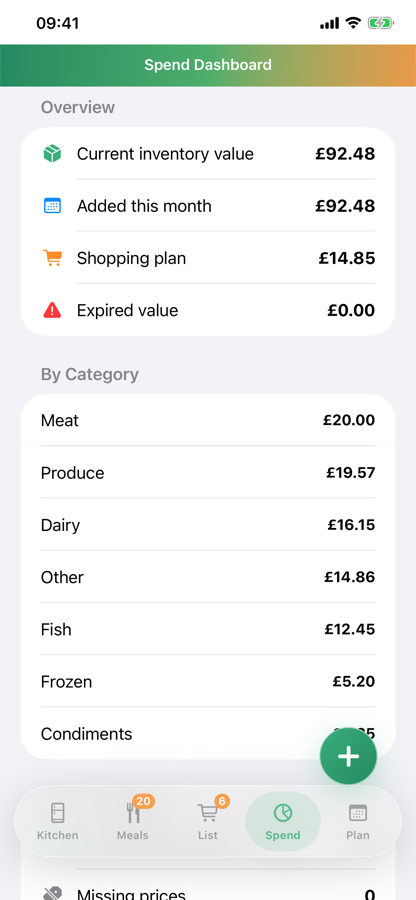
Grocery spend dashboard in KeepItFresh
Spend clearlyYour grocery budget at a glance

Features

Everything connected.
Nothing overwhelming.

Explore the tools by the job they help you finish.

01 Keep trackKnow what is in your kitchen and what needs attention.
Kitchen inventoryFridge, freezer and cupboards in one view.
Use soonSpot food approaching its expiry date.
Search & viewsFind items quickly in the layout you prefer.
02 Get food inCapture a shop before putting everything away.
Quick entryAdd names, dates, quantities and locations.
Barcode scanningScan supported packaged products.
Receipt scanningDetect a shop, review it and confirm the items.
03 Plan and shopConnect the week ahead with the food you already own.
Shopping listMove bought items straight into your kitchen.
RemindersAdd essentials the moment they run low.
Meal planGive breakfast, lunch and dinner a place.
Spend dashboardUnderstand where your grocery budget goes.
04 Get ideasMake more of your ingredients and favourite meals.
Recipe ideasFind inspiration from food already in your kitchen.
Saved recipesKeep the meals that worked close at hand.
Siri shortcutsAdd shopping items hands-free with Pro.

Everything works together

From “what have we got?”
to “dinner’s sorted.”

KeepItFresh connects the everyday jobs that usually live in separate notes, lists and guesses.

01

Kitchen inventory

See what you have at a glance.

Keep your fridge, freezer and cupboards organised by category, location, quantity and expiry date. Search quickly, track partial amounts and spot what needs using next.

  • Clear “use soon” view
  • Flexible expiry dates
  • List, card and icon views
Kitchen inventory overview in KeepItFresh
02

Fast adding

Add food while it’s still in your hand.

Enter an item in seconds, scan a supported barcode or capture a receipt and confirm the details before anything is added.

  • Quick manual entry
  • Barcode scanning
  • Receipt scanning with review
Add food options in KeepItFresh
03

Shopping list

A list that understands your kitchen.

Add what you need, mark it bought and move it straight into your inventory. Your shop becomes the start of an organised kitchen—not another admin job.

  • Simple, focused lists
  • Move purchases into stock
  • Voice shortcut support
Shopping list in KeepItFresh

Turn ingredients into ideas

Make more of
what’s already there.

Ask for recipe inspiration based on your current ingredients, save favourites and shape a week of meals around the food you want to use.

Try KeepItFresh
Saved recipes in KeepItFresh
AI recipe finder in KeepItFresh

Understand your spend

See where your grocery budget goes with a clear dashboard that makes patterns easier to spot.

KeepItFresh food spend dashboard

Plan the week

Bring breakfast, lunch and dinner together in a weekly plan, and assign ingredients so nothing is accidentally promised twice.

One app, the whole kitchen

Everything you need.
Nothing you don’t.

From the moment food comes through the door to the meal it becomes, KeepItFresh keeps the small details connected.

Use soon

Spot what needs attention.

Keep soon-to-expire and expired food visible before it gets forgotten.

Quick entry

Add food in seconds.

Capture names, dates, quantities, locations and categories with a focused entry flow.

Barcode scanning

Scan supported products.

Use a barcode to speed up adding common packaged food to your kitchen.

Receipt scanning

Turn a receipt into a head start.

Capture your shop, review the detected items and confirm them before anything is added.

Connected shopping list

Shop with your kitchen in mind.

Add what you need, mark it bought and move purchases straight into your inventory when you get home.

Shopping reminders

Remember the little things.

Add essentials when they run low and keep the list ready for your next shop.

AI recipe ideas

Find dinner in the food you already have.

Ask for recipe inspiration shaped around your current ingredients, then turn forgotten food into a meal worth saving.

Saved recipes

Keep good ideas close.

Save favourite recipes so the meals that worked are easy to find again.

Weekly meal plan

Give every meal a place.

Plan breakfast, lunch and dinner, and assign ingredients across the week.

Spend dashboard

Understand your grocery spend.

See where your food budget goes and make patterns easier to spot.

Search and views

Find food your way.

Search quickly and switch between list, card and icon views when it suits you.

Voice shortcuts

Add to your list hands-free.

Use supported voice shortcuts when your hands are busy in the kitchen.

About the developer

Built with care.
At an indie pace.

KeepItFresh is designed and developed by one independent developer, working on the app in spare time alongside everyday commitments.

Updates and larger features can sometimes take longer than they would with a big team. That does not mean the app has been forgotten—work continues as time allows, with practical improvements and real user needs guiding what comes next.

Share feedback

Actively developedBuilt in spare time, one thoughtful release at a time.

Care over speedUseful, considered changes matter more than rushing features out.

Feedback shapes the roadmapMessages from real kitchens help decide what deserves attention next.

Progress may take timeIf an improvement takes a little while, it has not necessarily been forgotten.

What’s next

Built for more kitchens.

Shared family organisation and an Android version are both in development.

Family Plan · In the works

One kitchen.
Everyone in sync.

In development

KeepItFresh Family is being built for households that shop, cook and manage food together—without relying on one person to keep everyone updated.

Four seats, one shared Kitchen

Share the organising—not just the shopping.

The Kitchen owner will be able to invite up to three additional people. Everyone joins with their own account, while the household’s food and plans stay connected.

01

Create and inviteThe owner creates the shared Kitchen and sends invitations to family or household members.

02

Use your own accountEach person joins with their own profile and an appropriate role in the Kitchen.

03

Stay in syncInventory, shopping lists, recipes and meal plans are designed to update across the shared Kitchen.

Keep me updated Launch timing, pricing and final details are still being worked on.

Android beta · Only 25 places

Help build KeepItFresh
for Android.

We’re looking for Android users to try early versions of the app in real kitchens, share honest feedback and help us make the Google Play release genuinely useful.

  • Limited to the first 25 eligible applicants we accept
  • Try the app’s core kitchen and shopping features
  • Report bugs and tell us what feels confusing
  • Help shape the Android experience before launch

Tips & tricks

Small shortcuts.
Smoother days.

Quick ways to get more from KeepItFresh—and make everyday kitchen jobs feel almost effortless.

Siri & Shortcuts

KeepItFresh Pro

Add to your shopping list without lifting a finger.

When you notice something has run out, ask Siri to add it there and then—without opening KeepItFresh. It works on iPhone, iPad and Apple Watch.

  1. 1

    Set it up onceIn KeepItFresh, open Settings → More Settings → Support → Siri & Shortcuts.

  2. 2

    Ask naturallySay, “Add milk to my KeepItFresh shopping list.” Siri will confirm when it’s done.

  3. 3

    Keep cookingThe item is waiting in your KeepItFresh shopping list for the next shop.

More practical KeepItFresh tips are on the way.

Good to know

Questions,
answered.

Everything you need to know before bringing KeepItFresh into your kitchen.

View on the App Store
What is KeepItFresh?

KeepItFresh is a kitchen companion for tracking food, expiry dates, shopping, recipes, meal plans and grocery spending in one place.

Is KeepItFresh free?

KeepItFresh is free to download from the App Store, so you can start organising your kitchen straight away.

Which devices can I use it on?

KeepItFresh is available now for iPhone and iPad. An Android version is coming soon to Google Play.

Can I test the Android version?

Yes—we’re accepting the first 25 eligible applicants. Apply through the contact form and choose “Join the Android beta.” Each participant who successfully completes testing receives one non-transferable lifetime Pro seat for the Android version, linked to one account. Full terms apply.

What will the Family Plan do?

The planned Family Plan will give one Kitchen owner four seats in total: their own plus invitations for up to three other people. Each person will use their own account while sharing the Kitchen’s inventory, shopping lists, recipes and meal plans. It is still in development, so launch timing, pricing and final details may change.

How do I add food?

Add items manually, scan a supported barcode or capture a shopping receipt. Receipt results are shown for review before anything is added.

How does it help reduce food waste?

KeepItFresh makes food that needs using easy to spot, then helps you turn the ingredients you already have into meal ideas.

Does the shopping list connect to my inventory?

Yes. Mark an item as bought and move it into your kitchen inventory, keeping shopping and food tracking connected.

How do AI recipe ideas work?

KeepItFresh uses the ingredients in your kitchen to inspire recipes, helping you decide what to cook before buying more food.

Can I plan meals and track spending too?

Yes. Build a weekly breakfast, lunch and dinner plan, assign ingredients and use the spend dashboard to understand where your grocery budget goes.

Help shape KeepItFresh

Questions, ideas
or fresh thinking?

Whether you need a hand or have a feature that would make your kitchen easier, we’d genuinely like to hear it.

Get supportAsk a question or tell us what isn’t working.

Request a featureShare the improvement you’d most like to see.

Prefer to email directly? hello@keepitfresh.app

Send us a message

We’ll prepare it in your email app.

Nothing is uploaded by this form. Your email app will open with the message ready for you to review and send.

Your kitchen, but easier

Ready to keep it fresh?

Bring your food, shopping, meals and spend together. Start free today.

Download on theApp Store Coming soon onGoogle Play
QR code linking to KeepItFresh on the App Store Scan to downloadOpen KeepItFresh on your iPhone